


avianca
4.72.02K Reviews
App Specs
- Version
- 9.5.3
- Updated On
- License
- Free
- Downloads
- 5,000,000+
- Developer
- Avianca
- Categories
- Travel & Local
- Platform
- Android, iOS
Screenshots
 Analysis by AppCompare
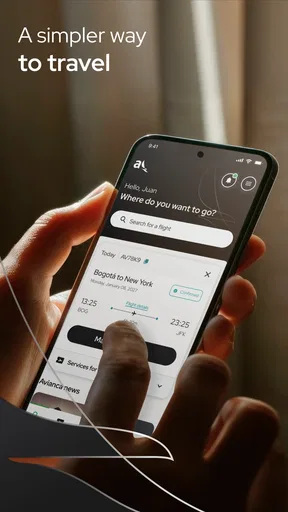
When I travel with Avianca, the part I value most is not having another airline icon on my phone. It is having one place to handle the moments that usually create the most stress: buying a ticket, checking in, and checking whether a flight is still moving according to plan. The app turns those tasks into a simple travel workflow, and that makes it especially useful when I am already on the way to the airport.
Avianca is a free Travel & Local app from Avianca for Android and iOS. It is suitable for everyone, and its long presence in the mobile stores shows that it is not a temporary companion built around a single campaign. The current version is 9.5.3, and the app requires operating system version 10 or later. With an average rating of 4.7 from around 110 thousand ratings and more than 5 million installs, it is clearly used by a large number of travelers.
Flight status is the feature that matters most when plans change
Although the app covers several stages of a journey, I see flight-status checking as its most practical capability. Searching for a flight before leaving home is easy enough through many channels. The real value appears later, when I need a quick answer without opening a browser, finding the airline’s page, and working out where the relevant information is located.
The app’s purpose is direct: I can use it to find out what is happening with my flight, while the same application also supports ticket purchase and check-in. That combination matters because travel tasks are connected. A change in timing affects when I leave for the airport, when I complete check-in, and how much time I have to deal with baggage or transportation.
In my experience, a focused airline app is more useful than a general travel tool when the question concerns one specific Avianca booking. A flight-aggregation app may be better for comparing different airlines, routes, or broad travel options. Once I have chosen Avianca, however, the airline’s own app is the more natural place to manage that trip.
What the status feature changes in everyday travel
The biggest benefit is not that the app makes a delay disappear. It gives me a faster way to decide what to do next. If I am still at home, the information can influence when I leave. If I am travelling to the airport, it can tell me whether I should continue directly or pause to reassess. If I am already inside the terminal, it can reduce the need to search through several screens or depend entirely on a public display.
That is a modest capability, but it has a real effect. Travel decisions are often made in short bursts, and a mobile status check is more convenient than treating every update as a separate research task. I also like that the same app can take me from checking the flight to handling check-in, instead of forcing me to remember which service belongs to which part of the journey.
Worth Reading Before You Choose

Flipboard Shows What News Apps Must Do Beyond the Feed

Switching to Android Auto Means Rethinking Your Driving Routine

Google Calendar Makes a Crowded Week Easier to Manage

Ludo King Makes the Most of the Minutes Between Plans

Baby Panda World Brings Quick Play to Modern Phones, but Its Game Library Feels Busy

ESPN’s Live Game View Makes Following Close Games Easier
There is an important distinction, though. The app is most helpful for checking the airline’s flight information, not for replacing every source of airport information. I would still pay attention to terminal screens and announcements, particularly when I am already at the airport. The app is a useful reference, but I would not treat any single screen as the only authority during a complicated disruption.
How I use it before and during a trip
My preferred workflow starts before the travel day. I open the app when I am ready to buy an Avianca ticket, then keep it available as the trip gets closer. This creates a practical sequence: purchase first, check the flight later, and complete check-in when it becomes relevant. I do not have to move between a booking website, a separate status page, and another check-in tool.
The first useful habit is to check the flight before leaving for the airport rather than waiting until I am on the road. That small step gives me time to react if the schedule has changed. I also check again before entering the terminal, because the situation can evolve while I am travelling. These checks are more valuable than repeatedly opening the app without a reason; I use them at decision points.
For check-in, I prefer doing the task when I have a stable connection and enough time to correct a mistake. Completing it while rushing through a crowded terminal is less comfortable. The app’s role here is practical rather than glamorous: it puts the action close to the flight information, which reduces the number of places I need to search.
One non-obvious advantage is that the app can act as a preparation tool even when I do not expect a problem. I can use it to confirm that I am looking at the correct Avianca journey before I make other arrangements around it. That is useful when several travel dates, passengers, or airport transfers are involved. It does not eliminate the need to read the booking carefully, but it helps keep the airline-specific part of the trip in one place.
A realistic airport-day example
Imagine I have a morning Avianca flight and a long ride to the airport. Before leaving, I check the flight status in the app. If the schedule is unchanged, I continue with my original plan and use the app for check-in if I have not already completed it. During the ride, I avoid constant checking and look again when I am close to the airport. That second check gives me a current reference before I commit to the final part of the journey.
Once inside, I can use the app as a quick reminder of the flight I am managing, while still checking the airport’s own displays for gate and terminal instructions. If the flight is delayed, the app helps me recognize that the timetable has changed, but I still need to make a sensible decision about food, transport, connections, and boarding information. The useful lesson is that the app supports decisions; it does not make those decisions for me.
For a connecting itinerary, I would be more cautious. A status update for one flight does not automatically solve the wider problem of a missed connection or a changed onward plan. I would use the app to understand the Avianca flight itself, then review the rest of the journey separately. That is a better approach than assuming one status screen covers every consequence.
Buying tickets inside the same travel tool
The ticket-purchase function makes the app more useful at the beginning of the journey, especially for travelers who already know they want to fly with Avianca. I would not choose it as my first research tool if I were comparing the entire market. A comparison service can make it easier to view competing airlines and different combinations in one place.
On the other hand, if I have already chosen Avianca, purchasing through the airline’s app keeps the decision and the later management steps close together. That can be more straightforward than comparing on one platform and then moving to another service to manage the booking. The trade-off is simple: broader comparison elsewhere, tighter airline-specific handling here.
I also recommend checking the itinerary details slowly before completing a purchase. A mobile interface encourages quick taps, especially when I am travelling or using a small screen. The app can simplify the transaction, but it cannot protect me from choosing the wrong date, airport, or passenger information. The convenience is real, yet careful review remains part of the process.
Where the app is strongest and where it creates friction
The strongest point is the connection between three practical actions: purchasing, checking in, and following the flight. These are not random airline extras. They form a sensible timeline, and the app follows that timeline well. I can start with a booking, return later to prepare for departure, and check the situation when travel is underway.
The app is also a better fit for repeat Avianca travelers than for someone who is only browsing destinations. Frequent users benefit from having a familiar place for airline-specific tasks. They are less likely to need an explanation of what the app is for, and they can build a routine around checking their flight and completing check-in.
The main limitation is its narrow scope. This is Avianca’s app, not a complete travel planner. It is not the right choice when I want to compare every airline, organize hotels, manage a broad multi-carrier itinerary, or find general destination ideas. Installing it will not replace those other tools. Its value comes from handling the Avianca portion of a journey well.
Another point of friction is that a status feature can create false confidence if I read it too literally. Flight operations can change, and airport instructions may become more specific than a general status message. I treat the app as one important source, then confirm practical details through airport information and staff when needed. That habit makes the app more useful because it keeps its role realistic.
There is also a device consideration. Because the app requires operating system version 10 or later, people using older phones may need to check compatibility before depending on it for a trip. For supported devices, the current version is 9.5.3, but I would still update it before travelling rather than waiting until I am using airport Wi-Fi or mobile data under pressure.
Small habits that make the experience better
Check the flight before starting the trip to the airport, not only after arriving.
Complete check-in when I have time and a reliable connection, rather than treating it as a last-minute airport task.
Use the app for Avianca-specific information while keeping airport displays and announcements in view.
Review the itinerary carefully during ticket purchase, especially when several travel dates or airports look similar.
Update the app before departure if the phone supports it, so the travel workflow is ready before the journey becomes hectic.
These habits reveal a useful trade-off. The app is not powerful because it removes every uncertainty; it is useful because it places the most relevant airline actions within easy reach. That distinction matters. Someone expecting a complete disruption-management system may be disappointed, while someone wanting a dependable Avianca companion will probably find the design more convincing.
Who should use it and who should choose another option
I would recommend the app most strongly to people who already have an Avianca booking or regularly consider Avianca for their flights. It is also a good choice for travelers who prefer handling check-in on a phone and want a direct way to review flight status without relying on a desktop browser. Families and less frequent travelers may appreciate the single-app approach because it reduces the number of airline pages they need to remember.
It is particularly useful for someone with a long journey to the airport. In that situation, a status check before departure can influence the entire morning, and another check near arrival can prevent me from relying on outdated assumptions. The app does not guarantee a smooth journey, but it gives that traveler a practical checkpoint at the moments when information matters most.
I would be less enthusiastic about recommending it as a standalone travel app to a person who has not chosen an airline. If the main goal is to compare fares, schedules, airlines, or complex combinations, a broader travel-search service is a better starting point. The Avianca app becomes more valuable after the airline decision has been made.
I would also advise caution for travelers who manage complicated itineraries involving several carriers. The app can still be useful for the Avianca segment, but it should not become the only place they monitor the journey. For those trips, a broader itinerary manager plus each airline’s own information may provide a clearer overall view.
The age rating of Everyone makes the app broadly approachable, and its free price removes a financial barrier to trying it. Still, the best reason to install it is not simply that it costs nothing. The reason is that its functions line up with the moments when an Avianca passenger needs quick, airline-specific access.
My final assessment after using it as a travel companion
I see Avianca as a focused tool rather than an all-purpose travel assistant. Its central strength is the way it brings flight-status checking into the same workflow as ticket purchase and check-in. That matters most on travel day, when a quick update can affect when I leave, what I do at the airport, and how confidently I move through the next step.
The app is not a substitute for airport announcements, a comparison service, or careful itinerary planning. Its limitations are closely tied to its purpose: it serves Avianca passengers, so people looking for broad travel discovery or multi-airline control should look elsewhere. For the right user, that narrow focus is an advantage rather than a weakness.
With more than 2 thousand written reviews and a strong 4.7 average, it has earned a positive reception among a substantial user base. I would judge it less by the rating alone and more by whether its workflow matches my trip. If I am flying with Avianca, I would keep it installed, check the flight at sensible decision points, complete check-in before the airport rush, and use the app alongside—not instead of—the airport’s own information.
My recommendation is simple: use it when you want a direct Avianca travel companion, especially for flight-status checks that help you decide what to do next. That is where the app feels most useful, and it is also where its practical value is clearer than the generic promise of having an airline app on a phone.
Pros
- Convenient mobile check-in and digital boarding pass access.
- Flight status updates help travelers track schedule changes.
- Manage bookings and select seats directly from the app.
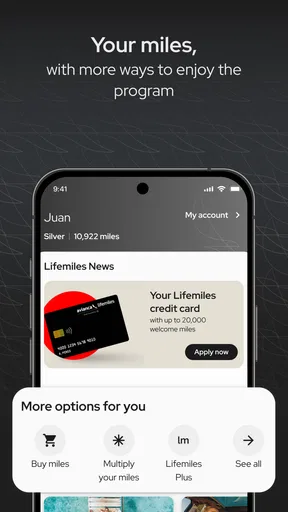
- Supports Avianca LifeMiles account access and rewards tracking.
- Useful travel information is available in one centralized place.
Cons
- Some features may require a stable internet connection while traveling.
- App performance can vary after major updates or during peak periods.
- Certain booking changes may still require contacting customer support.
- Extra fees may not always be clearly understood during checkout.
- The experience is mainly useful for Avianca passengers
- not all airlines.
FAQs for avianca
What is the Avianca app used for?
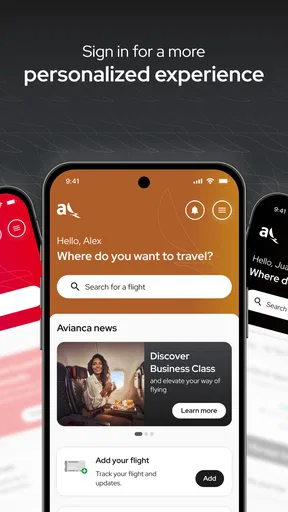
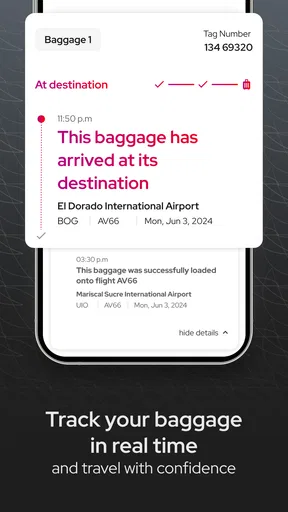
The Avianca app is the airline’s mobile companion for managing trips from an Android or iOS device. After signing in or entering your reservation details, you can search and book flights, review itineraries, check baggage information, complete online check-in when available, access your boarding pass, and receive travel updates. It is particularly useful for keeping reservation details in one place while traveling.
Can I book flights and manage my reservation through the Avianca app?
Yes. The app allows users to search for available Avianca flights, compare schedules and fares, and complete a booking using the supported payment options. If you already have a reservation, you can usually retrieve it with the booking code and passenger information to review flight details, make eligible changes, select seats, or check additional services. Available options may vary depending on the route, fare, and booking conditions.
Can I check in and use a mobile boarding pass with Avianca?
In many cases, the Avianca app lets eligible passengers check in online and obtain a digital boarding pass. The check-in window, airport restrictions, document requirements, and availability can differ by destination, passenger type, and itinerary. Before leaving for the airport, make sure the boarding pass is accessible in the app and that your identification or travel documents meet the destination’s requirements.
Does the Avianca app provide flight status and travel notifications?
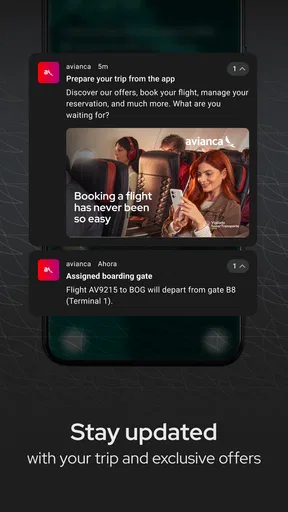
The app can help passengers monitor itinerary information and, when supported, receive updates related to flight schedules, boarding, delays, gate changes, or other travel events. Notifications may depend on your device permissions, internet connection, and whether the reservation is correctly linked to your account. Because airline information can change quickly, it is still wise to check airport screens and official staff announcements.
Is the Avianca app free, and does using it replace contacting customer service?
Downloading and using the Avianca app is generally free, although flight purchases, baggage, seat selection, fare differences, and other services may involve additional charges. The app is convenient for routine tasks, but it does not replace customer support in every situation. Complex itinerary changes, refunds, irregular operations, or document problems may require contacting Avianca directly through its official support channels.


